


- Joined
- May 15, 2023
- Messages
- 447
- Reaction score
- 843
- Points
- 617

Freebie: Increase the lifetime of your SSD. Did you know that your precious SSD drive has a limited lifetime (number of write accesses per memory cell)? Do you want to increase the life of your SSD? SSD Fresh helps you to deactivate all unnecessary write acritivites of your system.
Increase the lifetime of your SSD drive
View drive information
Get information about your drive and the manufacturer. SSD Fresh displays general information suitable for the hard drives that are installed in the computer. You can see for example the storage capacity and how much space is already occupied.
View S.M.A.R.T. data
Modern hard drives use a system for self-monitoring, called S.M.A.R.T. (Self-Monitoring, Analysis and Reporting Technology) system. It analyzes the disk and already indicates defects before they can cause data loss. SSD Fresh reads this information and displays it in the window.
Disabling the Windows defragmentation
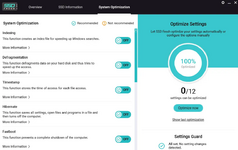
Since SSDs have the same access time for all memory cells, there is no need to store them coherently. In addition this, the defragmentation process generates write hits, which reduce the lifetime of the SSD. Therefore, it is highly recommended to deactivate the defragmentation process.
Timestamp deactivation
Windows stores the access time for each file access. This produces unnecessary write hits and thus will reduce the lifetime of your SSD. Disabling of this feature is highly recommended.
Prefetch off
Prefetch supports preloading of frequently used applications into RAM. Because of the fast access times off SSDs, this function is useless and can be disabled.
Disabling the defragmentation of boot files
Because of the way that files are stored in SSDs, a defragmentation of boot files makes no sense and should be disabled as it reduces the lifetime of your SSD.
Deactivation of the Windows event logging
Windows permanently records system configuration changes, as well as crashes and other events from various services and programs. This creates unnecessary write accesses and reduces the lifetime of your SSD.
Storing short name off
For compatibility with old 16-bit DOS applications, Windows creates short names for folders and files, which results in additional write accesses to your SSD. Current applications do not need those names, which is why they can be disabled.
Whats New
Updates: official site does not provide any info about changes in this version
File size: 6.2 MB


To see this hidden content, you must react with one of the following reactions :  Love, Wow
Love, Wow