


- Joined
- May 15, 2023
- Messages
- 496
- Reaction score
- 926
- Points
- 677
GiliSoft Screen Recorder Pro is a professional video program for screen recording and editing / converting video to PC. This program is suitable for creating video tutorials or even entire lectures, manuals on the use of various applications or reviews of video games.
Screen Recorder pro is a program for recording screen video and editing video in the integrated video editor and converting it into any video format that captures what is happening on the screen, program sounds and your voice at the same time, saving the recording to a compressed video file in real time.
Main features of the program:
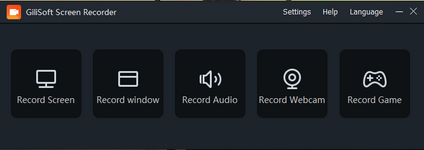
Full screen recording mode.
Windows in write mode.
Recording area mode.
Support for computer games based on DirectX and OpenGL.
Customizable audio / video quality
High performance screen capture driver for older PCs.
Good audio / video synchronization.
Capture settings from speakers, microphone and external lines.
Writing to FLV files.
The ability to capture the mouse cursor or not.
Capture a screenshot of the desktop or active window in Windows.
Automatically split video files by time or by size.
Easy to use
Indicator of the record or frame rate in the game.
Customizable hotkeys.
Convert video and audio of all popular formats.
Convert HD and AVCHD to popular formats.
Extract audio from m4a, wma, wav, mp3, aac, ac3, ape, mka, ogg, etc. video files
Crop video to create the perfect picture for different screen sizes.
Transfer all your video files to your favorite format.
Adding special effects to videos, such as discoloration, embossing, negative and old film.
Add any text, image or watermark, change the color of your video files.
Add and edit subtitles in .MKV files, create plug-in subtitles in SRT format.
Setting video / audio output parameters such as resolution, frame rate,
encoder, level and bit rate.
Set brightness, contrast, saturation and volume.
Support converting multiple files at once.
What's new:
official site does not provide any info about changes in this version.
File Size: 149.2 MB
To see this hidden content, you must reply or react with one of the following reactions :  Love, Wow
Love, Wow